Building Airflow DAGs for ML Retraining: A Complete Guide
Jan 18, 2025
Machine learning models degrade over time. It's not a question of if, but when.
As a data engineer or ML engineer, you'll be tasked with building automated retraining pipelines. Manual retraining doesn't scale—you need orchestration.
Apache Airflow has become the industry standard for orchestrating ML workflows. But there's a gap between "I know Airflow basics" and "I can build production-grade retraining pipelines."
Most tutorials show you toy examples with dummy data. This guide shows you how to build real retraining DAGs that handle data drift, model validation, deployment decisions, and failure recovery.
Let's build a production-ready retraining pipeline from scratch.
Why Airflow for ML Retraining
When working with production ML systems, you need more than cron jobs.
What Manual Retraining Looks Like
# Monday morning
python train.py
python evaluate.py
python deploy.py

# Oops, failed on line 47
# Debug for 2 hours
# Try again
Problems:
No retry logic
No failure notifications
No dependency management
No visibility into what's running
Doesn't scale beyond one person
What Airflow Gives You
# Define workflow once
dag = DAG('ml_retraining', schedule='@daily')

# Tasks run automatically
# Retries on failure
# Sends alerts
# Tracks history
# Scales across machines
```

**Benefits:**
- ✅ Automated scheduling
- ✅ Dependency management
- ✅ Retry logic built-in
- ✅ Email/Slack alerts
- ✅ Visual monitoring
- ✅ Parallelization
- ✅ Historical tracking

---

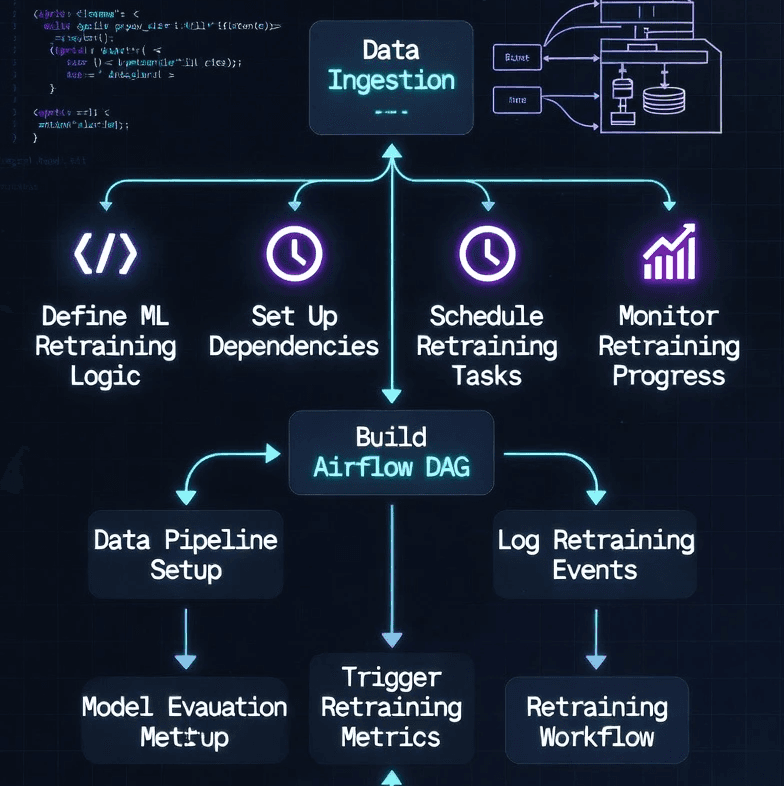
## **Anatomy of a Retraining DAG**

Before writing code, understand the workflow structure.

### **Typical Retraining Pipeline**
```
1. Check if retraining is needed
   ↓
2. Extract fresh training data
   ↓
3. Validate data quality
   ↓
4. Train new model
   ↓
5. Evaluate performance
   ↓
6. Compare with production model
   ↓
7. Deploy if better (or reject if worse)
   ↓
8. Update model registry
   ↓
9. Send notification
Key Considerations
When should retraining trigger?
Time-based (daily, weekly)
Performance-based (accuracy drops)
Data-based (new data available)
Event-based (model update request)
What if training fails?
Retry automatically
Alert on-call engineer
Keep old model running
Log failure for analysis
What if new model is worse?
Don't deploy
Keep production model
Investigate why
Trigger alert
Setting Up Your Airflow Environment
First, get Airflow running properly.
Installation (Local Development)
# Create virtual environment
python -m venv airflow_venv
source airflow_venv/bin/activate

# Install Airflow
export AIRFLOW_HOME=~/airflow
pip install "apache-airflow==2.7.0" --constraint "https://raw.githubusercontent.com/apache/airflow/constraints-2.7.0/constraints-3.10.txt"

# Install ML dependencies
pip install scikit-learn pandas numpy mlflow

# Initialize database
airflow db init

# Create admin user
airflow users create \
    --username admin \
    --password admin \
    --firstname Admin \
    --lastname User \
    --role Admin \
    --email admin@example.com

# Start webserver and scheduler
airflow webserver --port 8080
Docker Compose (Production-like)
# docker-compose.yml
version: '3.8'

services:
  postgres:
    image: postgres:15
    environment:
      POSTGRES_USER: airflow
      POSTGRES_PASSWORD: airflow
      POSTGRES_DB: airflow
    volumes:
      - postgres_data:/var/lib/postgresql/data

  airflow-webserver:
    image: apache/airflow:2.7.0
    depends_on:
      - postgres
    environment:
      AIRFLOW__CORE__EXECUTOR: LocalExecutor
      AIRFLOW__DATABASE__SQL_ALCHEMY_CONN: postgresql+psycopg2://airflow:airflow@postgres/airflow
      AIRFLOW__CORE__FERNET_KEY: ${AIRFLOW_FERNET_KEY}
      AIRFLOW__CORE__LOAD_EXAMPLES: 'false'
    volumes:
      - ./dags:/opt/airflow/dags
      - ./logs:/opt/airflow/logs
      - ./plugins:/opt/airflow/plugins
    ports:
      - "8080:8080"
    command: webserver

  airflow-scheduler:
    image: apache/airflow:2.7.0
    depends_on:
      - postgres
    environment:
      AIRFLOW__CORE__EXECUTOR: LocalExecutor
      AIRFLOW__DATABASE__SQL_ALCHEMY_CONN: postgresql+psycopg2://airflow:airflow@postgres/airflow
    volumes:
      - ./dags:/opt/airflow/dags
      - ./logs:/opt/airflow/logs
      - ./plugins:/opt/airflow/plugins
    command: scheduler

volumes:
  postgres_data
# Start Airflow
docker-compose up -d

# Access UI
Basic Retraining DAG
Let's start with a simple daily retraining pipeline.
dags/ml_retraining_basic.py
from airflow import DAG
from airflow.operators.python import PythonOperator
from airflow.utils.dates import days_ago
from datetime import timedelta
import pandas as pd
from sklearn.ensemble import RandomForestClassifier
from sklearn.model_selection import train_test_split
from sklearn.metrics import accuracy_score
import joblib
from pathlib import Path

# Default arguments
default_args = {
    'owner': 'ml-team',
    'depends_on_past': False,
    'email': ['ml-alerts@company.com'],
    'email_on_failure': True,
    'email_on_retry': False,
    'retries': 2,
    'retry_delay': timedelta(minutes=5)
}

# Define DAG
dag = DAG(
    'ml_retraining_basic',
    default_args=default_args,
    description='Basic ML model retraining pipeline',
    schedule_interval='@daily',  # Run every day at midnight
    start_date=days_ago(1),
    catchup=False,
    tags=['ml', 'retraining']
)

def extract_training_data(**context):
    """Extract fresh training data from database"""
    # In production, you'd query your data warehouse
    # For this example, we'll load from file

    print("Extracting training data...")

    # Simulate data extraction
    # df = pd.read_sql("SELECT * FROM transactions WHERE date > NOW() - INTERVAL '90 days'", conn)
    df = pd.read_csv('/data/transactions.csv')

    # Filter recent data
    df['date'] = pd.to_datetime(df['date'])
    cutoff_date = pd.Timestamp.now() - pd.Timedelta(days=90)
    df_recent = df[df['date'] > cutoff_date]

    print(f"Extracted {len(df_recent)} training samples")

    # Save to temporary location
    output_path = '/tmp/training_data.parquet'
    df_recent.to_parquet(output_path)

    # Push metadata to XCom
    context['task_instance'].xcom_push(key='data_path', value=output_path)
    context['task_instance'].xcom_push(key='num_samples', value=len(df_recent))

    return output_path

def validate_data(**context):
    """Validate data quality before training"""
    # Pull data path from previous task
    data_path = context['task_instance'].xcom_pull(
        task_ids='extract_data',
        key='data_path'
    )

    print(f"Validating data from {data_path}")

    df = pd.read_parquet(data_path)

    # Check for required columns
    required_cols = ['feature1', 'feature2', 'feature3', 'target']
    missing_cols = [col for col in required_cols if col not in df.columns]

    if missing_cols:
        raise ValueError(f"Missing required columns: {missing_cols}")

    # Check for nulls
    null_counts = df[required_cols].isnull().sum()
    if null_counts.any():
        print(f"Warning: Found null values: {null_counts[null_counts > 0].to_dict()}")
        # Fill or drop nulls
        df = df.dropna(subset=required_cols)
        df.to_parquet(data_path)  # Save cleaned data

    # Check target distribution
    target_dist = df['target'].value_counts(normalize=True)
    print(f"Target distribution: {target_dist.to_dict()}")

    if target_dist.min() < 0.05:
        print("Warning: Imbalanced dataset detected")

    print("✓ Data validation passed")

    return True

def train_model(**context):
    """Train new model with fresh data"""
    data_path = context['task_instance'].xcom_pull(
        task_ids='extract_data',
        key='data_path'
    )

    print("Training new model...")

    # Load data
    df = pd.read_parquet(data_path)

    X = df[['feature1', 'feature2', 'feature3']]
    y = df['target']

    # Split
    X_train, X_test, y_train, y_test = train_test_split(
        X, y, test_size=0.2, random_state=42, stratify=y
    )

    # Train
    model = RandomForestClassifier(
        n_estimators=100,
        max_depth=10,
        random_state=42,
        n_jobs=-1
    )

    model.fit(X_train, y_train)

    # Evaluate
    train_score = model.score(X_train, y_train)
    test_score = model.score(X_test, y_test)

    print(f"Train accuracy: {train_score:.4f}")
    print(f"Test accuracy: {test_score:.4f}")

    # Save model
    model_path = '/tmp/new_model.pkl'
    joblib.dump(model, model_path)

    # Push metrics to XCom
    context['task_instance'].xcom_push(key='model_path', value=model_path)
    context['task_instance'].xcom_push(key='train_accuracy', value=train_score)
    context['task_instance'].xcom_push(key='test_accuracy', value=test_score)

    return model_path

def evaluate_model(**context):
    """Evaluate new model against production model"""
    new_model_path = context['task_instance'].xcom_pull(
        task_ids='train_model',
        key='model_path'
    )
    new_accuracy = context['task_instance'].xcom_pull(
        task_ids='train_model',
        key='test_accuracy'
    )

    print("Evaluating new model...")

    # Load production model
    prod_model_path = '/models/production_model.pkl'

    if Path(prod_model_path).exists():
        prod_model = joblib.load(prod_model_path)

        # Load test data
        data_path = context['task_instance'].xcom_pull(
            task_ids='extract_data',
            key='data_path'
        )
        df = pd.read_parquet(data_path)
        X_test = df[['feature1', 'feature2', 'feature3']]
        y_test = df['target']

        # Evaluate production model
        prod_accuracy = prod_model.score(X_test, y_test)

        print(f"Production model accuracy: {prod_accuracy:.4f}")
        print(f"New model accuracy: {new_accuracy:.4f}")
        print(f"Improvement: {(new_accuracy - prod_accuracy):.4f}")

        # Decision: deploy if new model is at least as good
        should_deploy = new_accuracy >= prod_accuracy * 0.98  # Allow 2% tolerance

    else:
        print("No production model found. Will deploy new model.")
        should_deploy = True

    context['task_instance'].xcom_push(key='should_deploy', value=should_deploy)

    return should_deploy

def deploy_model(**context):
    """Deploy new model to production"""
    should_deploy = context['task_instance'].xcom_pull(
        task_ids='evaluate_model',
        key='should_deploy'
    )

    if not should_deploy:
        print("❌ New model does not meet deployment criteria. Keeping production model.")
        return False

    new_model_path = context['task_instance'].xcom_pull(
        task_ids='train_model',
        key='model_path'
    )

    print("🚀 Deploying new model to production...")

    # Copy to production location
    import shutil
    prod_model_path = '/models/production_model.pkl'
    shutil.copy(new_model_path, prod_model_path)

    print(f"✓ Model deployed to {prod_model_path}")

    return True

def send_notification(**context):
    """Send notification about retraining results"""
    should_deploy = context['task_instance'].xcom_pull(
        task_ids='evaluate_model',
        key='should_deploy'
    )
    new_accuracy = context['task_instance'].xcom_pull(
        task_ids='train_model',
        key='test_accuracy'
    )
    num_samples = context['task_instance'].xcom_pull(
        task_ids='extract_data',
        key='num_samples'
    )

    if should_deploy:
        message = f"""
        ✅ Model Retraining Successful

        New model deployed to production.

        Metrics:
        - Test Accuracy: {new_accuracy:.2%}
        - Training Samples: {num_samples:,}
        - Timestamp: {pd.Timestamp.now()}

        Check monitoring dashboard for live performance.
        """
    else:
        message = f"""
        ⚠️ Model Retraining Completed - No Deployment

        New model did not outperform production model.

        Metrics:
        - Test Accuracy: {new_accuracy:.2%}
        - Training Samples: {num_samples:,}
        - Timestamp: {pd.Timestamp.now()}

        Review training logs for details.
        """

    print(message)

    # In production, send to Slack:
    # slack_webhook = Variable.get("slack_webhook_url")
    # requests.post(slack_webhook, json={'text': message})

    return message

# Define tasks
extract_data = PythonOperator(
    task_id='extract_data',
    python_callable=extract_training_data,
    dag=dag
)

validate = PythonOperator(
    task_id='validate_data',
    python_callable=validate_data,
    dag=dag
)

train = PythonOperator(
    task_id='train_model',
    python_callable=train_model,
    dag=dag
)

evaluate = PythonOperator(
    task_id='evaluate_model',
    python_callable=evaluate_model,
    dag=dag
)

deploy = PythonOperator(
    task_id='deploy_model',
    python_callable=deploy_model,
    dag=dag
)

notify = PythonOperator(
    task_id='send_notification',
    python_callable=send_notification,
    dag=dag
)

# Set dependencies
extract_data >> validate >> train >> evaluate >> deploy >> notify
Advanced Pattern: Conditional Retraining
In production, you don't want to retrain if the model is performing well. Use sensors to check performance first.
Performance-Based Triggering
from airflow.sensors.python import PythonSensor
import requests

def check_model_performance(**context):
    """Check if retraining is needed based on Prometheus metrics"""

    # Query Prometheus for model accuracy
    prometheus_url = "http://prometheus:9090/api/v1/query"

    # Get current accuracy
    accuracy_query = "ml_model_accuracy"
    response = requests.get(prometheus_url, params={'query': accuracy_query})

    if response.status_code == 200:
        result = response.json()
        if result['data']['result']:
            current_accuracy = float(result['data']['result'][0]['value'][1])

            print(f"Current production accuracy: {current_accuracy:.4f}")

            # Check if accuracy dropped below threshold
            threshold = 0.90
            needs_retraining = current_accuracy < threshold

            if needs_retraining:
                print(f"⚠️ Accuracy {current_accuracy:.4f} < {threshold:.4f}. Retraining needed.")
            else:
                print(f"✓ Accuracy {current_accuracy:.4f} >= {threshold:.4f}. No retraining needed.")

            return needs_retraining

    # If can't get metrics, assume retraining needed
    print("⚠️ Could not retrieve metrics. Defaulting to retrain.")
    return True

# Add sensor at start of DAG
check_performance = PythonSensor(
    task_id='check_performance',
    python_callable=check_model_performance,
    mode='poke',
    poke_interval=300,  # Check every 5 minutes
    timeout=3600,       # Give up after 1 hour
    dag=dag
)

# New dependency chain
check_performance >> extract_data >> validate >> train >> evaluate >> deploy >> notify
Handling Different Model Types
Different models require different training approaches.
Deep Learning Models (Long Training)
from airflow.operators.bash import BashOperator

train_dl_model = BashOperator(
    task_id='train_dl_model',
    bash_command="""
    cd /opt/ml &&
    python train_neural_net.py \
        --epochs 50 \
        --batch-size 32 \
        --data-path {{ ti.xcom_pull(task_ids='extract_data', key='data_path') }} \
        --output-path /tmp/dl_model.h5
    """,
    dag=dag
)

# Or use KubernetesPodOperator for GPU training
from airflow.providers.cncf.kubernetes.operators.kubernetes_pod import KubernetesPodOperator

train_on_gpu = KubernetesPodOperator(
    task_id='train_on_gpu',
    name='ml-training-pod',
    namespace='ml-training',
    image='myorg/ml-training:latest',
    cmds=['python', 'train.py'],
    arguments=['--gpu', '--epochs', '100'],
    resources={
        'request_memory': '16Gi',
        'request_cpu': '4',
        'limit_memory': '32Gi',
        'limit_cpu': '8',
        'limit_nvidia.com/gpu': '1'
    },
    dag=dag
)
Distributed Training (PySpark)
from airflow.providers.apache.spark.operators.spark_submit import SparkSubmitOperator

train_spark_model = SparkSubmitOperator(
    task_id='train_spark_model',
    application='/opt/spark/train_ml_model.py',
    conf={
        'spark.executor.memory': '8g',
        'spark.executor.cores': '4',
        'spark.executor.instances': '10'
    },
    application_args=[
        '--input', '{{ ti.xcom_pull(task_ids="extract_data", key="data_path") }}',
        '--output', '/tmp/spark_model'
    ],
    dag=dag
)
MLflow Integration
Track experiments and manage model versions.
MLflow Tracking in DAG
import mlflow

def train_with_mlflow(**context):
    """Train model with MLflow tracking"""

    # Set MLflow tracking URI
    mlflow.set_tracking_uri("http://mlflow:5000")
    mlflow.set_experiment("model_retraining")

    data_path = context['task_instance'].xcom_pull(
        task_ids='extract_data',
        key='data_path'
    )

    df = pd.read_parquet(data_path)
    X = df[['feature1', 'feature2', 'feature3']]
    y = df['target']

    X_train, X_test, y_train, y_test = train_test_split(X, y, test_size=0.2)

    # Start MLflow run
    with mlflow.start_run(run_name=f"retrain_{context['ds']}"):

        # Log parameters
        params = {
            'n_estimators': 100,
            'max_depth': 10,
            'training_date': context['ds'],
            'num_samples': len(X_train)
        }
        mlflow.log_params(params)

        # Train model
        model = RandomForestClassifier(**params)
        model.fit(X_train, y_train)

        # Evaluate and log metrics
        train_score = model.score(X_train, y_train)
        test_score = model.score(X_test, y_test)

        mlflow.log_metric("train_accuracy", train_score)
        mlflow.log_metric("test_accuracy", test_score)

        # Log model
        mlflow.sklearn.log_model(model, "model")

        # Register model if good enough
        if test_score > 0.90:
            model_uri = f"runs:/{mlflow.active_run().info.run_id}/model"
            mlflow.register_model(model_uri, "FraudDetectionModel")

        # Save locally too
        model_path = '/tmp/new_model.pkl'
        joblib.dump(model, model_path)

        context['task_instance'].xcom_push(key='model_path', value=model_path)
        context['task_instance'].xcom_push(key='test_accuracy', value=test_score)
        context['task_instance'].xcom_push(key='mlflow_run_id', value=mlflow.active_run().info.run_id)

    return model_path
Data Quality Checks with Great Expectations
Add robust data validation before training.
Great Expectations Integration
import great_expectations as ge

def validate_with_great_expectations(**context):
    """Validate data quality with Great Expectations"""

    data_path = context['task_instance'].xcom_pull(
        task_ids='extract_data',
        key='data_path'
    )

    # Load data as GE DataFrame
    df = ge.read_csv(data_path)

    # Define expectations
    expectations = [
        df.expect_column_values_to_not_be_null('feature1'),
        df.expect_column_values_to_not_be_null('feature2'),
        df.expect_column_values_to_not_be_null('target'),
        df.expect_column_values_to_be_between('feature1', min_value=-10, max_value=10),
        df.expect_column_values_to_be_in_set('target', [0, 1]),
        df.expect_column_mean_to_be_between('feature1', min_value=-1, max_value=1),
    ]

    # Validate
    validation_results = df.validate(expectation_suite=expectations)

    if not validation_results['success']:
        failed_expectations = [
            exp for exp in validation_results['results']
            if not exp['success']
        ]

        error_msg = f"Data validation failed: {len(failed_expectations)} expectations failed"
        print(error_msg)

        for exp in failed_expectations:
            print(f"  - {exp['expectation_config']['expectation_type']}")

        raise ValueError(error_msg)

    print("✓ Data validation passed all expectations")

    return True
Parallel Training with BranchPythonOperator
Train multiple model types and pick the best.
Multi-Model Training
from airflow.operators.python import BranchPythonOperator

def train_random_forest(**context):
    """Train Random Forest"""
    # Training code
    # Return accuracy via XCom
    pass

def train_xgboost(**context):
    """Train XGBoost"""
    # Training code
    # Return accuracy via XCom
    pass

def train_logistic_regression(**context):
    """Train Logistic Regression"""
    # Training code
    # Return accuracy via XCom
    pass

def select_best_model(**context):
    """Select best performing model"""

    rf_accuracy = context['task_instance'].xcom_pull(task_ids='train_rf', key='accuracy')
    xgb_accuracy = context['task_instance'].xcom_pull(task_ids='train_xgb', key='accuracy')
    lr_accuracy = context['task_instance'].xcom_pull(task_ids='train_lr', key='accuracy')

    accuracies = {
        'deploy_rf': rf_accuracy,
        'deploy_xgb': xgb_accuracy,
        'deploy_lr': lr_accuracy
    }

    best_model = max(accuracies, key=accuracies.get)

    print(f"Best model: {best_model} with accuracy {accuracies[best_model]:.4f}")

    return best_model

# Define tasks
train_rf = PythonOperator(task_id='train_rf', python_callable=train_random_forest, dag=dag)
train_xgb = PythonOperator(task_id='train_xgb', python_callable=train_xgboost, dag=dag)
train_lr = PythonOperator(task_id='train_lr', python_callable=train_logistic_regression, dag=dag)

select_model = BranchPythonOperator(
    task_id='select_best',
    python_callable=select_best_model,
    dag=dag
)

deploy_rf = PythonOperator(task_id='deploy_rf', python_callable=deploy_model, dag=dag)
deploy_xgb = PythonOperator(task_id='deploy_xgb', python_callable=deploy_model, dag=dag)
deploy_lr = PythonOperator(task_id='deploy_lr', python_callable=deploy_model, dag=dag)

# Dependencies
extract_data >> [train_rf, train_xgb, train_lr] >> select_model
select_model >> [deploy_rf, deploy_xgb, deploy_lr]
Error Handling and Retries
Production DAGs need robust error handling.
Retry Configuration
from airflow.exceptions import AirflowException

default_args = {
    'owner': 'ml-team',
    'retries': 3,
    'retry_delay': timedelta(minutes=5),
    'retry_exponential_backoff': True,
    'max_retry_delay': timedelta(minutes=30),
    'execution_timeout': timedelta(hours=2),
    'on_failure_callback': notify_failure,
    'on_success_callback': notify_success,
    'on_retry_callback': notify_retry
}

def notify_failure(context):
    """Send alert on DAG failure"""
    task_instance = context['task_instance']
    exception = context['exception']

    message = f"""
    ❌ DAG Failed: {context['dag'].dag_id}

    Task: {task_instance.task_id}
    Execution Date: {context['execution_date']}
    Error: {str(exception)}

    Log: {task_instance.log_url}
    """

    # Send to Slack/PagerDuty
    print(message)

def notify_retry(context):
    """Log retry attempts"""
    task_instance = context['task_instance']

    print(f"⚠️ Retrying {task_instance.task_id} (attempt {task_instance.try_number})")
Custom Exception Handling
def train_with_error_handling(**context):
    """Train model with comprehensive error handling"""

    try:
        data_path = context['task_instance'].xcom_pull(
            task_ids='extract_data',
            key='data_path'
        )

        if not Path(data_path).exists():
            raise FileNotFoundError(f"Training data not found: {data_path}")

        df = pd.read_parquet(data_path)

        if len(df) < 1000:
            raise ValueError(f"Insufficient training data: {len(df)} samples")

        # Training logic...
        model = train_model(df)

        return model

    except FileNotFoundError as e:
        print(f"❌ Data error: {e}")
        # Don't retry for missing data
        raise AirflowException(f"Fatal error: {e}")

    except ValueError as e:
        print(f"❌ Validation error: {e}")
        # This should retry
        raise e

    except Exception as e:
        print(f"❌ Unexpected error: {e}")
        # Log for debugging
        import traceback
        traceback.print_exc()
        raise e
Monitoring DAG Performance
Track DAG execution metrics.
Custom Metrics
from airflow.models import Variable
from prometheus_client import Counter, Gauge, Histogram
import time

# Define metrics
dag_duration = Histogram(
    'airflow_dag_duration_seconds',
    'DAG execution duration',
    ['dag_id']
)

task_failures = Counter(
    'airflow_task_failures_total',
    'Total task failures',
    ['dag_id', 'task_id']
)

model_accuracy = Gauge(
    'ml_model_accuracy',
    'Model test accuracy',
    ['model_version']
)

def train_with_metrics(**context):
    """Train model and record metrics"""

    start_time = time.time()

    try:
        # Training logic
        model = train_model()
        accuracy = evaluate_model(model)

        # Record metrics
        duration = time.time() - start_time
        dag_duration.labels(dag_id=context['dag'].dag_id).observe(duration)
        model_accuracy.labels(model_version=context['ds']).set(accuracy)

        print(f"Training completed in {duration:.2f}s with accuracy {accuracy:.4f}")

        return model

    except Exception as e:
        task_failures.labels(
            dag_id=context['dag'].dag_id,
            task_id=context['task'].task_id
        ).inc()
        raise e
Best Practices for Production DAGs
✅ DO:
Use XCom for small data
# Good: Pass paths, not data
context['ti'].xcom_push(key='model_path', value='/tmp/model.pkl')

# Bad: Pass large objects
# context['ti'].xcom_push(key='model', value=trained_model)  # Don't do this!
Idempotent tasks
def extract_data(**context):
    """Idempotent data extraction"""
    output_path = f"/tmp/data_{context['ds']}.parquet"

    # Check if already extracted
    if Path(output_path).exists():
        print("Data already extracted, skipping")
        return output_path

    # Extract data
    df = extract_from_source()
    df.to_parquet(output_path)

    return output_path
Clear task dependencies
# Good: Explicit dependencies
extract >> validate >> train >> evaluate >> deploy

# Bad: Implicit dependencies
# Tasks assume order without declaring it
Parameterize with Variables
from airflow.models import Variable

# Store configuration in Airflow Variables
MODEL_THRESHOLD = Variable.get("model_accuracy_threshold", default_var=0.90)
DATA_LOOKBACK_DAYS = Variable.get("data_lookback_days", default_var=90)
Use connection for external services
from airflow.hooks.base import BaseHook

# Get database connection
conn = BaseHook.get_connection('ml_database')
conn_string = f"postgresql://{conn.login}:{conn.password}@{conn.host}:{conn.port}/{conn.schema}"
❌ DON'T:
Don't pass large data via XCom
Don't hardcode credentials
Don't create DAGs dynamically (in loops)
Don't have tasks with side effects
Don't skip error handling
Testing Your DAGs
Test before deploying to production.
Unit Tests
# tests/test_dags.py

import pytest
from airflow.models import DagBag

def test_dag_loads():
    """Test that DAG loads without errors"""
    dagbag = DagBag(dag_folder='dags/', include_examples=False)

    assert len(dagbag.import_errors) == 0, f"DAG import errors: {dagbag.import_errors}"
    assert 'ml_retraining_basic' in dagbag.dags

def test_dag_structure():
    """Test DAG structure is correct"""
    dagbag = DagBag(dag_folder='dags/', include_examples=False)
    dag = dagbag.get_dag('ml_retraining_basic')

    # Check expected tasks exist
    expected_tasks = [
        'extract_data',
        'validate_data',
        'train_model',
        'evaluate_model',
        'deploy_model'
    ]

    for task_id in expected_tasks:
        assert task_id in dag.task_ids, f"Missing task: {task_id}"

    # Check dependencies
    extract_task = dag.get_task('extract_data')
    assert 'validate_data' in [t.task_id for t in extract_task.downstream_list]

def test_task_function():
    """Test individual task function"""
    from dags.ml_retraining_basic import validate_data

    # Mock context
    context = {
        'task_instance': MockTaskInstance()
    }

    # Test function
    result = validate_data(**context)
    assert result == True
Integration Tests
from airflow.models import DagBag
from airflow.utils.state import State

def test_dag_run():
    """Test full DAG execution"""
    dagbag = DagBag(dag_folder='dags/')
    dag = dagbag.get_dag('ml_retraining_basic')

    # Clear previous runs
    dag.clear()

    # Run DAG
    dag.run(
        start_date=datetime(2025, 1, 1),
        end_date=datetime(2025, 1, 1),
        executor=SequentialExecutor()
    )

    # Check all tasks succeeded
    for task in dag.tasks:
        task_instance = task.get_task_instance(datetime(2025, 1, 1))
        assert task_instance.state == State.SUCCESS
Conclusion
Building production-grade retraining DAGs requires more than basic Airflow knowledge.
Key takeaways:
✅ Conditional retraining - Use sensors to check if retraining is needed
✅ Data validation - Validate before training
✅ Model evaluation - Compare with production before deploying
✅ Error handling - Retry, alert, log
✅ MLflow integration - Track experiments
✅ Monitoring - Metrics for every step
✅ Testing - Test DAGs before production
The complete workflow:
Check if retraining needed (sensor)
Extract fresh data
Validate data quality
Train new model
Evaluate performance
Compare with production
Deploy if better
Log to MLflow
Send notification
This pattern scales from simple models to complex multi-model systems.
Example implementation:
I've implemented this pattern in my fraud detection system with automated retraining triggered by accuracy drops. Check it out:
GitHub: github.com/Shodexco
Questions? Let's connect:
Portfolio: jonathansodeke.framer.website
GitHub: github.com/Shodexco
LinkedIn: www.linkedin.com/in/jonathan-sodeke
Now go build bulletproof retraining pipelines. Your models will stay fresh automatically.
About the Author
Jonathan Sodeke is a Data Engineer and ML Engineer who builds production ML systems with automated retraining pipelines. He specializes in MLOps, Airflow orchestration, and keeping models performing well in production.
When he's not building DAGs at 2am, he's optimizing ML workflows and helping teams scale their ML operations.
Portfolio: jonathansodeke.framer.website
GitHub: github.com/Shodexco
LinkedIn: www.linkedin.com/in/jonathan-sodeke

Sign Up To My Newsletter
Get notified when a new article is posted.
Sign Up To My Newsletter
Get notified when a new article is posted.
Sign Up To My Newsletter
Get notified when a new article is posted.